What is the Token Layer MCP Server?
The Token Layer MCP (Model Context Protocol) server enables AI assistants like Claude, ChatGPT, Cursor, and Windsurf to interact directly with the Token Layer platform. This allows AI to:- Create and deploy tokens on blockchain networks
- Trade tokens with automatic price quotes and execution
- Search and discover tokens across multiple chains
- Execute blockchain transactions on your behalf
See It In Action
Watch how easy it is to integrate Thrust with your AI assistant:Claude Code Integration
Claude Desktop Integration
Why Use the MCP Server?
Natural Language Trading
Trade tokens by simply describing what you want: “Buy 100 USDC worth of TOKEN” or “Sell half my holdings”
Token Creation
Launch tokens through conversation: “Create a meme coin called DogeCat with symbol DOGCAT”
Cross-Platform
Works with Claude Code, Claude Desktop, ChatGPT, Cursor, Windsurf, and any MCP-compatible client
Multi-Chain Support
Trade and create tokens across Ethereum, Base, BNB Chain and more
Quick Start
Get started in minutes with your preferred AI assistant:Claude Code
Add Thrust to Claude Code CLI with one command
Claude Desktop
Connect via Settings → Connectors
ChatGPT
Add custom connector in ChatGPT settings
Cursor & Windsurf
Configure MCP in your code editor
Available Capabilities
The MCP server provides comprehensive tools for Token Layer integration:Token Operations
- create_token - Deploy new tokens on Base or BNB networks with custom branding
- search_token - Find tokens by name, symbol, or contract address
- get_tokens - Browse trending, new, or popular tokens with filters
- trade_token - Buy or sell tokens with automatic quote execution
- quote_trade_token - Get price quotes without executing trades
Blockchain
- execute_transaction - Send transactions on-chain with gas fee handling
Security & Authentication
- Non-custodial: The MCP server uses your Thrust account but never stores private keys
- OAuth 2.0: Secure authentication flow when connecting
- API Keys: Bearer token authentication for programmatic access
- Scoped Access: Only performs actions you explicitly authorize
How It Works
- AI asks you what you want to do
- AI calls MCP tools with your request
- MCP server authenticates with your credentials
- Actions execute on Token Layer platform
- Results return to AI for confirmation
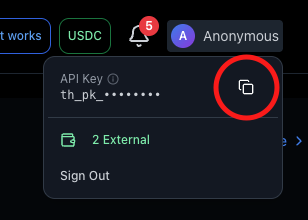
Getting Your API Key
To connect the MCP server, you’ll need an API key:- Visit tokenlayer.network
- Hover over your profile avatar in the header
- Click to copy your API key
Next Steps
Installation Guide
Step-by-step setup for your AI assistant
Tools Reference
Complete documentation of all available MCP tools
Example Prompts
Ready-to-use prompts for common tasks
API Reference
Direct API access for custom integrations
Support
Need help with MCP server setup?- Chat with us in the bottom right corner